Most teams do not fail at ML delivery because they chose the wrong tool first. They fail because the operating model stays fuzzy for too long.
They know they need tracking. They know they need deployment. They know they probably need a registry, some automation and some kind of promotion path. But they still leave the most important questions unanswered: where models are trained, where they are validated, what gets promoted between environments, and which part of the platform actually owns production behavior.
That is why I think ML delivery patterns are a more useful topic than yet another generic “Azure MLOps setup” walkthrough.
The practical center of gravity is usually MLflow. It gives teams a portable layer for experiment tracking, model packaging and model lifecycle metadata. Then the real architectural choice becomes: what kind of operating model do we put around it?
In practice I see three realistic patterns:
MLflow + Azure Machine Learningas a managed ML delivery stackMLflow + Databricksas a lakehouse-centric delivery stack- an
external control planepattern with tools such as Weights & Biases around the core delivery flow
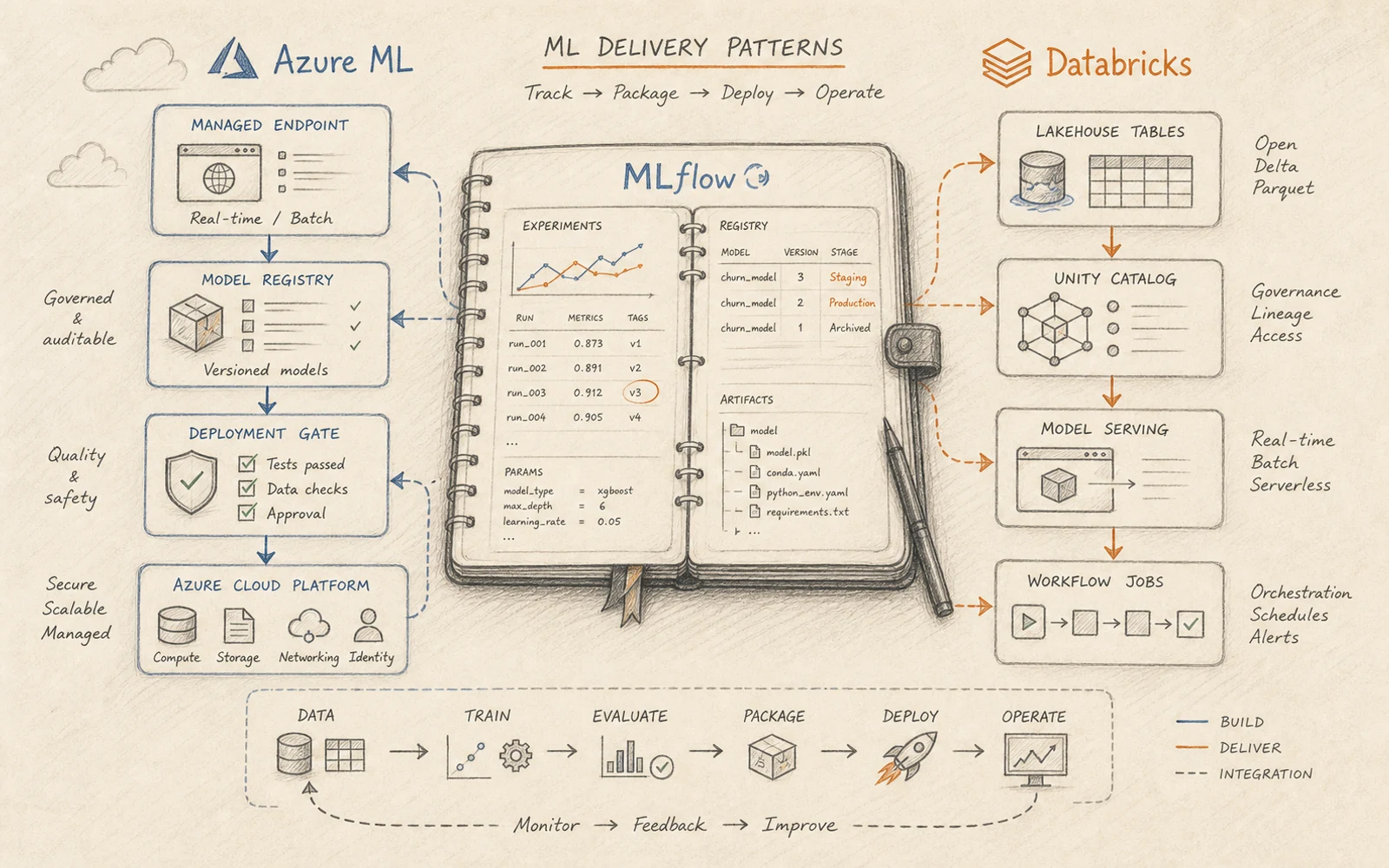
If you want the broader context for why this matters after the first model demo, start with Beyond the Notebook: what has to exist before ML can run in production and What MLOps actually is and why teams keep misdefining it.
Start with MLflow, but do not stop there
The most useful thing about MLflow is not that it solves everything. It is that it gives you a relatively portable contract for the parts that should not become cloud-specific too early.
According to the official MLflow and Azure Machine Learning documentation, Azure Machine Learning workspaces are MLflow-compatible and can be used as your tracking server. Microsoft also explicitly recommends MLflow logging in the v2 world to keep training routines portable and cloud-agnostic instead of coupling logging behavior to Azure-specific SDK patterns.
On the Databricks side, the official MLflow on Databricks documentation describes MLflow as the layer that ties together experiment tracking, evaluation, registry and deployment, with Unity Catalog and Model Serving around it.
That is the right mental model.
MLflow is usually the shared backbone for:
- run tracking
- parameters and metrics
- model packaging
- model registration
- the basic contract between training and downstream promotion
It is not, by itself, a full production operating model. It does not answer how environments are separated, how promotion works, where inference lives, how approval gates are enforced, or how monitoring is wired into the rest of the platform.
Pattern 1: MLflow plus Azure Machine Learning
This is the pattern I would choose when the center of gravity is a managed ML platform rather than the lakehouse itself.
Azure Machine Learning works well when you want MLflow-compatible tracking, explicit job execution, managed online endpoints, managed batch endpoints and a clearer separation between model delivery concerns and the rest of the data platform. The official Microsoft documentation is strong here. Azure Machine Learning supports deploying MLflow models to both online and batch endpoints, and the deployment guidance for MLflow models makes an important distinction: the MLflow SDK can cover some online deployment scenarios, but Azure ML CLI, SDK or Studio are the broader tools when you need platform-controlled deployment behavior, customization or batch workloads.
That distinction matters in real teams. It usually means:
- MLflow stays the tracking and packaging layer
- Azure ML jobs or pipelines own controlled execution
- Azure ML registry and endpoint primitives own release behavior
- online and batch inference are treated as separate operational choices, not as the same thing with different YAML
This pattern fits well when:
- the organization already standardizes on Azure platform controls
- inference endpoints need a managed home with clear operational boundaries
- the team wants a more service-oriented delivery model
- production access is tighter than development access and environment separation matters a lot
The Azure ML shape is especially good for teams that need a clearer distinction between experimentation and deployment. The platform gives them a firmer handoff from “we logged a model” to “we are serving a version through a managed endpoint.”
It is also a good fit when batch inference is a first-class requirement. Microsoft’s own guidance is explicit that Azure Machine Learning batch endpoints are a separate capability from the MLflow built-in serving model, and that they are meant for asynchronous, large-scale inference rather than pretending every prediction problem is an online API problem.
Pattern 2: MLflow plus Databricks
This pattern is stronger when your data gravity, feature pipelines and inference pipelines already live close to the lakehouse.
The official Databricks MLOps workflow documentation is useful here because it is unusually opinionated in the right places. Databricks recommends separate development, staging and production environments, Git-based code promotion, Delta-backed data assets, MLflow for model development, Unity Catalog for model lifecycle governance, and in most cases a deploy code, not models approach.
That last recommendation is one of the most important architectural choices in the whole article.
For many real teams, Databricks is not just “where the model was trained.” It is where the training data lives, where feature tables live, where validation data lives, where inference jobs run, where monitoring tables are produced and where governance already exists. In that world, pushing only a model artifact forward is often too small. The actual production unit is broader: code, data contracts, feature logic, validation checks, inference pipelines and monitoring jobs.
This pattern fits well when:
- the lakehouse is already the platform center of gravity
- training and inference depend heavily on Delta data and platform workflows
- batch or streaming inference is more common than low-latency request-response serving
- model governance should stay close to Unity Catalog and shared platform controls
Databricks also gives a practical production pattern around Champion and Challenger model aliases, endpoint traffic splitting and zero-downtime serving updates. That is not just nice platform ergonomics. It is an operating model for teams that want to compare, validate and roll forward without turning every release into a manual event.
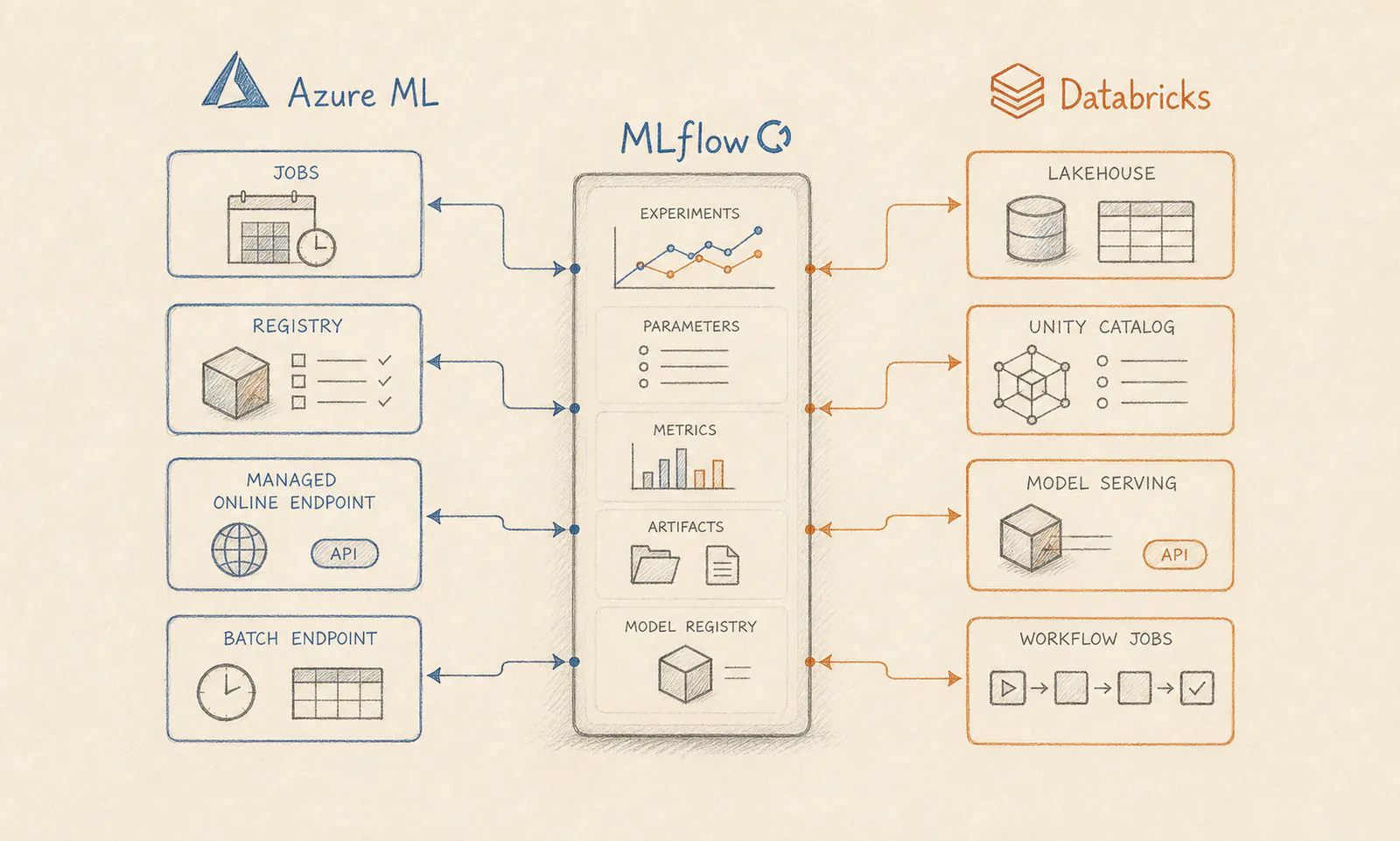
MLflow is the shared backbone, but the delivery model changes depending on whether the operating center is a managed ML platform or the lakehouse.
Pattern 3: an external control plane around the delivery stack
The third pattern is not hybrid cloud for its own sake. It is an external operating layer around the ML platform.
This usually appears when teams want a stronger collaboration, experiment-management or reporting surface that is more independent from the execution platform itself. In practice that can mean using MLflow as the packaging and model-lifecycle contract, while tools such as Weights & Biases take over part of the experiment comparison, reporting or team workflow layer.
This pattern can make sense when:
- multiple teams want one experiment and reporting surface across different runtimes
- the organization does not want the collaboration layer to live fully inside one platform vendor
- model development spans different environments, but delivery still needs a stable contract
- the team genuinely benefits from an extra control plane instead of just another dashboard
The upside is flexibility. The downside is also flexibility.
The moment you add an external control plane, the number of lifecycle surfaces grows. Now the team has to explain where the source of truth lives for experiments, where the deployable model contract lives, and which system actually decides what becomes production.
That is why I would use this pattern only when the extra layer solves a real problem such as cross-platform experiment coordination, broader team visibility or a collaboration workflow that the core platform does not cover well enough. If not, it becomes one more place to maintain discipline manually.
The most important decision is often deploy code versus deploy model
This is where many delivery discussions become too tool-centric.
The official Databricks model deployment patterns guidance is blunt about it: in most situations, Databricks recommends promoting code rather than model artifacts. The reasoning is solid. Code review, integration testing, production training on production data and automated retraining all become more coherent when the promoted unit is the reviewed training and deployment logic, not only a serialized model.
I agree with that for most teams.
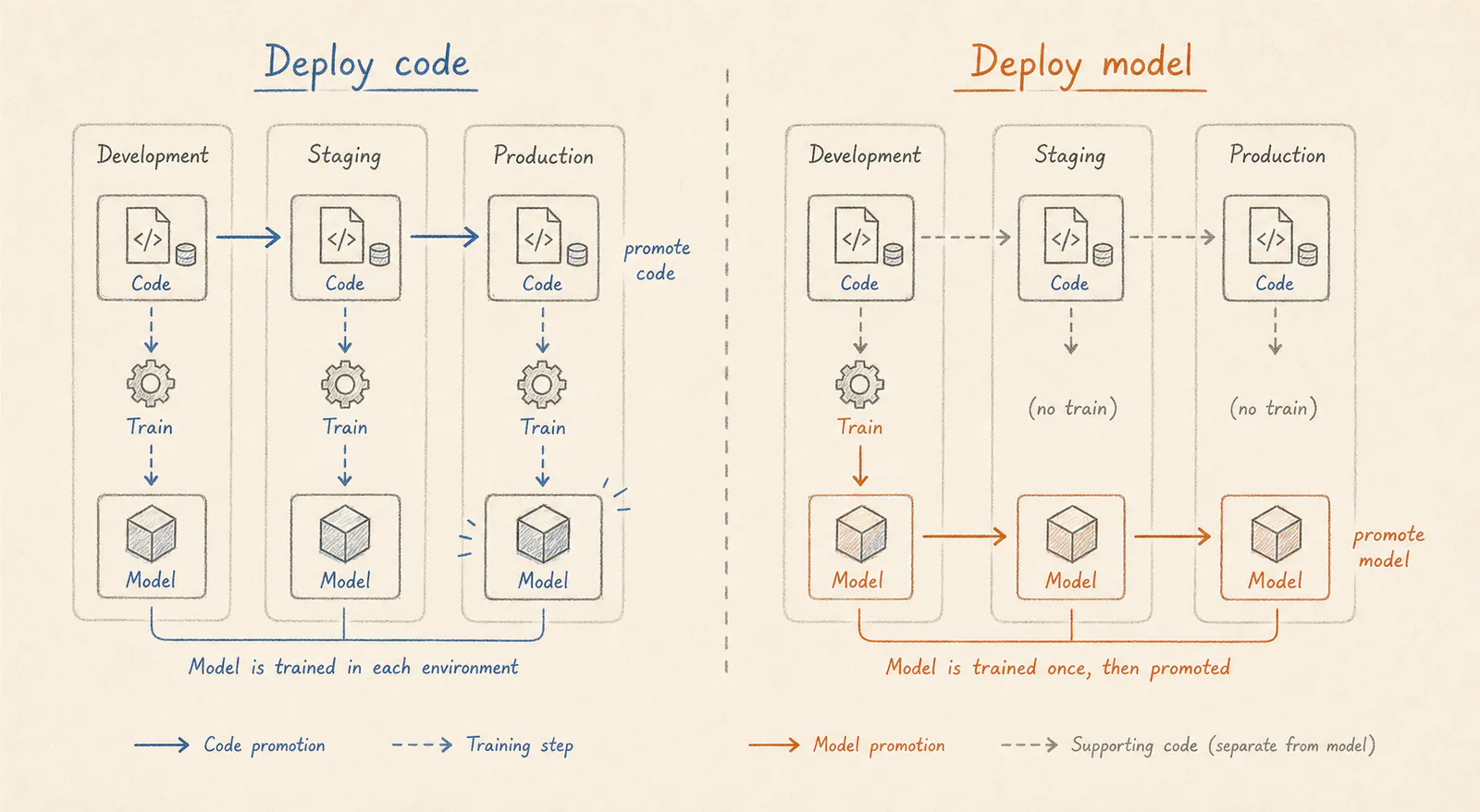
Deploy code promotes the reviewed training and delivery logic between environments. Deploy model promotes the trained artifact itself. The difference looks small on a slide and large in production.
Deploy code is usually the better default when:
- production data is only accessible in production
- retraining is expected to happen repeatedly
- feature logic and monitoring logic are part of the release
- engineering discipline matters more than one-time convenience
Deploy model can still be the right answer when:
- training is very expensive
- the training environment is hard to reproduce
- a single artifact must move through tightly controlled validation gates
- the production team explicitly does not want to retrain in production
The mistake is not choosing one or the other. The mistake is never making the decision explicitly.
What survives real teams and real environments
The delivery pattern that survives is usually the one that standardizes a few things before the platform debate gets too loud.
First, standardize what every run must log in MLflow. Metrics alone are not enough. The team should know which data slice, code revision, environment and validation results belong to a model version.
Second, standardize the model promotion contract. A registered model should not mean “somebody liked this experiment.” It should mean the artifact passed a known validation boundary and has enough metadata to move forward.
Third, separate batch and real-time decisions early. Azure ML and Databricks both support multiple inference patterns, but the operational shape is not the same. Teams get into trouble when they delay this distinction and then discover that “serving” meant two completely different things to two different groups.
Fourth, keep monitoring in the same conversation as deployment. A release without feedback loops is still unfinished delivery work. If you need a baseline for that side, Minimal viable ML observability: what to monitor first is the companion piece.
A practical way to choose between Azure ML and Databricks
I would frame the decision in a small operating-model table:
| If your center of gravity is… | The better default is often… | Why |
|---|---|---|
| Azure-native ML delivery, managed endpoints, explicit environment handoff | Azure Machine Learning | The platform is built around Azure-native training and deployment workflows with managed online and batch endpoints |
| Lakehouse-native data pipelines, Delta features, batch or streaming inference close to data | Databricks | The data, feature, model and inference lifecycle can stay close to Unity Catalog and platform workflows |
| Cross-platform experiment collaboration, reporting or external workflow governance | External control plane | The delivery stack stays on Azure ML or Databricks, while collaboration or experiment operations live in a separate layer |
This is not a product ranking. It is an operating model choice.
Another useful shortcut is this:
- choose
Azure MLwhen serving control is the harder problem - choose
Databrickswhen data gravity and platform cohesion are the harder problem - choose an
external control planeonly when a separate collaboration or experiment layer clearly reduces coordination pain
Where MLflow still needs help from the rest of the platform
This is the part people sometimes understate when they position everything under “MLflow MLOps.”
MLflow is excellent at preserving the lifecycle trail around experiments, models and versions. It is not, by itself, your environment boundary, your approval workflow, your online serving control plane, your batch scheduler, your access model or your monitoring system.
That is why I would not position a production architecture as “just MLflow.” I would position it as:
MLflow for lifecycle disciplineAzure ML or Databricks for the operating modelplatform monitoring and governance for runtime accountability
That framing is also much closer to how production ML delivery actually works in real teams: tracking and model lifecycle need one layer, while serving, environment control, governance and runtime ownership need another.
FAQ
Is MLflow enough for production MLOps?
MLflow is often a strong backbone for tracking, model packaging and registry workflows, but it is not the whole operating model. Production delivery still needs decisions around training environments, validation, serving, access control, monitoring and promotion between stages.
When should I use Azure Machine Learning instead of Databricks for ML delivery?
Azure Machine Learning is often the better fit when the center of gravity is managed training jobs, managed online or batch endpoints, and a more explicit separation between ML engineering and broader data platform concerns. Databricks is often stronger when the center of gravity is already in the lakehouse, the feature and inference pipelines live close to Delta data, and model lifecycle should stay tightly coupled to Unity Catalog and platform workflows.
Do I still need MLflow if my team already uses Weights & Biases or another external tool?
Maybe, but not always. Some teams prefer MLflow as the portable model packaging and registry contract while using an external experiment or collaboration layer such as Weights & Biases. Others choose one primary system and keep the delivery contract simpler. The right answer depends on whether the extra tool reduces real coordination pain or only adds another control plane.
Should ML teams deploy code or deploy models?
Most teams should prefer deploying code unless model training is extremely expensive or hard to reproduce. Promoting reviewed training and validation code through environments usually produces a more stable and auditable operating model than manually moving model artifacts alone.
Final point
The right delivery pattern is not the one with the most services on the diagram.
It is the one that makes model training, validation, promotion, inference and monitoring understandable to more than one person, repeatable in more than one environment and survivable for a team that still has to operate the system six months later.
That is why I would start with MLflow, but I would never end the architecture discussion there.
Further reading
- MLflow and Azure Machine Learning
- Guidelines for deploying MLflow models in Azure Machine Learning
- MLflow on Databricks
- MLOps workflows on Azure Databricks
- Model deployment patterns on Databricks
- Why MLOps is mostly an engineering problem
- Feature stores: what they are, when you need one, and which use cases justify them