If you are looking for a practical custom MCP server Databricks tutorial, the most useful starting point is not a giant agent platform.
It is one small server, one understandable domain and one deployment flow that you can repeat without guessing.
That is why this guide uses a simple GTD assistant instead of another abstract demo. The tool surface is easy to reason about, the model has clear actions such as creating or completing tasks, and the storage layer is simple enough to port between local development and Databricks.
The result is a Databricks MCP server tutorial that stays close to real engineering work. You build the server in Python with FastMCP and FastAPI, run it locally with SQLite, then deploy the same app on Databricks Apps backed by a Unity Catalog Delta table and a SQL warehouse.
If your end goal is to understand how to deploy an MCP server on Databricks Apps, this is the shortest honest answer: keep the tools narrow, keep the domain logic independent from the transport, keep storage behind a small interface, and let Databricks Apps inject the runtime identity and resource bindings.
If you want the full project with the detailed setup instructions, notebooks and deployment files, the complete reference implementation is available on GitHub at maciejkepa/gtd-mcp-server.
What an MCP server is and what it is not
An MCP server is not “the agent” and it is not “the intelligence.”
It is the boundary that lets a host discover tools, send validated calls and receive structured results. In practice that means one thing matters more than anything else: the shape of the tools.
If the tools are vague, overloaded or side-effect-heavy, the model has to guess. If the tools are narrow, typed and predictable, the model can act with much more discipline. That is why MCP is useful. It forces capability design into something explicit.
In this project the host can ask for things like list_tasks, create_task, complete_task, create_project or get_stats. Those are concrete operations. They map cleanly to domain behavior and they return data that the next model step can actually use.
Why a GTD assistant is a good first MCP server
There is a practical reason I like this example.
Many first MCP tutorials either stay toy-level and useless, or they jump too quickly into complex retrieval, orchestration and multi-service integration. A GTD domain sits in a better middle ground. It is simple enough to explain, but still rich enough to prove the important ideas.
The model can capture something into an inbox, create a structured task, move work into progress, complete a task, list active projects and ask for next actions. That gives you reads, writes, validation, state transitions and simple analytics without needing a large data platform around it.
It also makes errors obvious. If complete_task marks the wrong task, you see it immediately. If list_tasks ignores filters, the bug is easy to reproduce. That makes this kind of project a much better learning vehicle than a vague “assistant_tools” example.
Why Databricks Apps is a good deployment target
If you only want to test MCP locally, SQLite and a local HTTP endpoint are enough.
The interesting part starts when you want the same server to live in a governed environment and stay close to platform resources. That is where Databricks Apps becomes useful. You can deploy a regular Python app, let the platform inject app identity, attach the resources the app is allowed to use and keep the deployment model small.
In this design the app gets a SQL warehouse and a UC table through resource mappings. The server does not need hardcoded workspace secrets in the repository, and it does not need a separate infrastructure stack just to expose /mcp.
That is a much better place to start than building a custom hosting layer around a tiny MCP server.
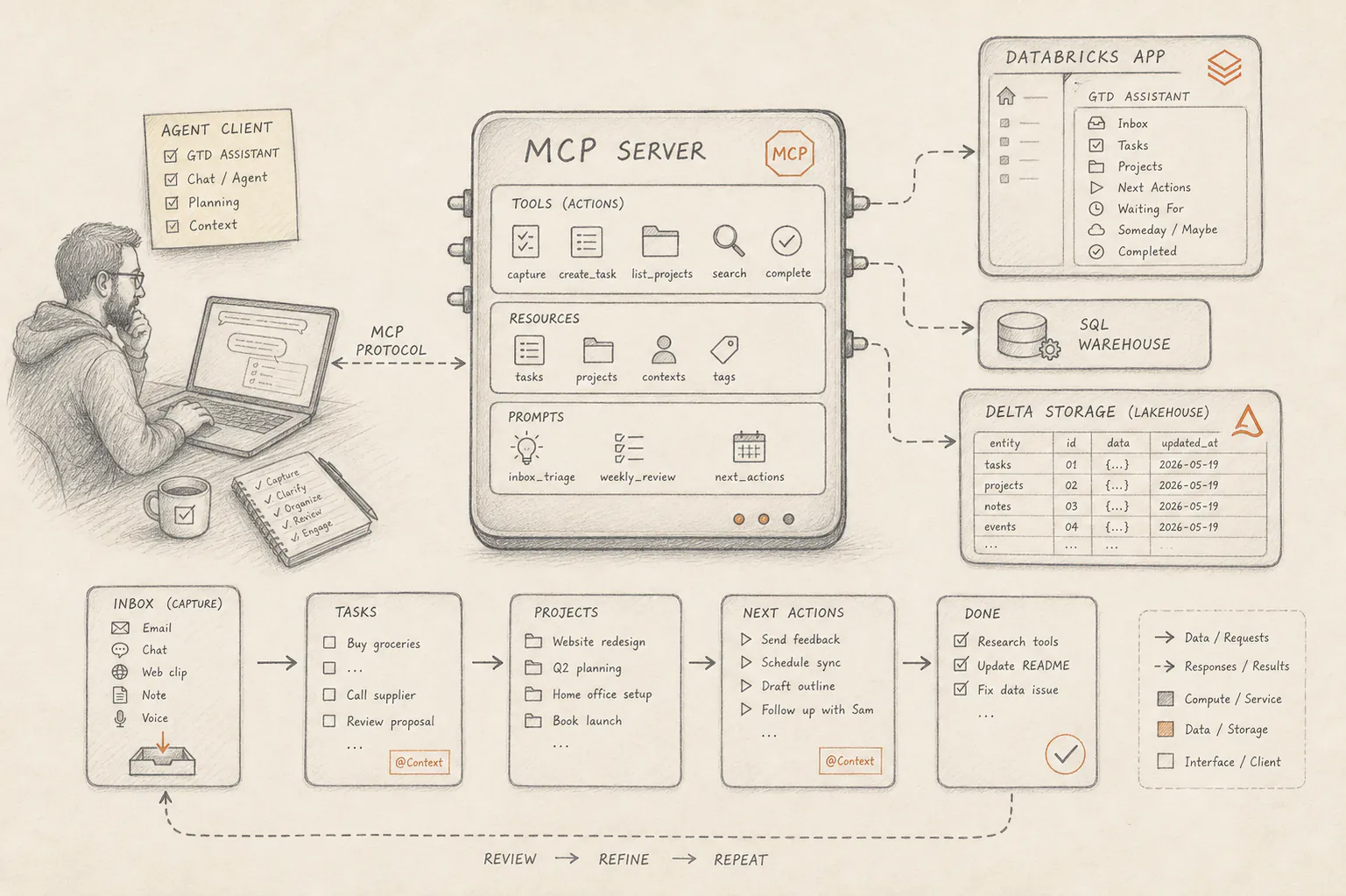
The architecture in one screen
The mental model is straightforward:
Local development
Codex or another MCP client
  -> http://localhost:8000/mcp
  -> FastMCP tools
  -> GTD domain layer
  -> SQLite document store

Databricks deployment
Databricks Playground
  -> Databricks App
  -> /mcp
  -> FastMCP tools
  -> GTD domain layer
  -> Delta-backed document store
  -> SQL warehouse
  -> gtd_mcp.app.gtd_mcp_records
The important point is not the diagram. The important point is that the tool layer and domain behavior stay the same while transport, credentials and storage backend change underneath.
Step 1: Design the tool surface before the infrastructure
This server exposes tools around three kinds of objects: inbox items, tasks and projects. It also exposes health and stats.
The key idea is that each tool does one thing clearly. capture_task puts raw text into the inbox. create_task creates a structured actionable task. start_task moves a task into progress. complete_task closes it. get_stats summarizes the current state.
That is much better than one mega-tool that accepts free-form instructions such as “do something with my tasks.”
The implementation in server.py keeps that contract very visible:
@mcp.tool()
def create_task(
    title: str,
    description: str = "",
    project_id: str | None = None,
    priority: str = "medium",
    context: str | None = None,
    due_date: str | None = None,
    tags: list[str] | None = None,
) -> dict[str, Any]:
    ...
From an MCP point of view, that is exactly what you want. The model sees a specific tool name, a bounded schema and a stable output shape. That is much easier to use correctly than a generic “task_manager” interface.
Step 2: Keep persistence behind a tiny storage boundary
The most useful design choice in this project is not FastMCP. It is the storage abstraction.
Instead of wiring every tool directly to SQLite or directly to Databricks SQL, the domain depends on a minimal DocumentStore interface with just three operations:
list(kind)
put(kind, id, payload)
delete(kind, id)
Everything else sits on top of that.
Tasks, projects and inbox captures all fit one shared record shape: kind, id, payload, created_at, updated_at. Local development uses SQLite. Databricks uses a Delta table with the same conceptual structure.
The environment-driven backend selection stays small on purpose:
def create_storage_from_env() -> GTDStorage:
    backend = os.getenv("GTD_STORAGE_BACKEND", "").lower()
    if not backend:
        backend = "delta" if os.getenv("DATABRICKS_APP_NAME") else "sqlite"

    if backend == "delta":
        return GTDStorage(DeltaDocumentStore.from_env())
    if backend == "sqlite":
        return GTDStorage(SQLiteDocumentStore(os.getenv("GTD_SQLITE_PATH", ".local/gtd.sqlite3")))

    raise ValueError("GTD_STORAGE_BACKEND must be 'sqlite' or 'delta'")
That one decision gives you a clean answer to a common problem: how to build a custom MCP server locally without making the Databricks deployment path a forked codebase.
Step 3: Build one app that serves both MCP and helper HTTP routes
The server is built with FastMCP and mounted into a FastAPI application. That gives you the MCP endpoint and a few helper HTTP routes in one process.
The setup is intentionally plain:
mcp = FastMCP(
    "gtd-server",
    stateless_http=True,
    json_response=True,
    streamable_http_path="/mcp",
)

app = FastAPI(
    title="GTD MCP Server",
    description="Getting Things Done task and project management over MCP and HTTP.",
)

app.router.routes.extend(mcp_http_app.routes)
The useful side effect is that you can validate the app in a browser or with curl before you ever connect an MCP client. /health, /stats, /tasks, /projects and /docs make manual checks much easier, while MCP clients still use /mcp.
This is one of those patterns that looks boring and ends up saving a lot of time.
Step 4: Keep local development simple
For a local setup, the project runs with SQLite and exposes the streamable HTTP endpoint on localhost:8000.
The workflow is short:
uv sync
uv run gtd-mcp-server
That creates local storage at .local/gtd.sqlite3 and exposes:
http://localhost:8000/health
http://localhost:8000/stats
http://localhost:8000/mcp
If you want to attach the local server to Codex, the MCP configuration is also deliberately small:
[mcp_servers.gtd]
enabled = true
url = "http://localhost:8000/mcp"
The project also supports stdio transport, but for most local iteration the HTTP path is easier to inspect and debug.
Step 5: Prepare Delta storage before you deploy
For the Databricks deployment, the table needs to exist before the app can use it as a resource.
The repository includes a setup notebook, docs/databricks_setup_storage.py, which creates:
gtd_mcp
gtd_mcp.app
gtd_mcp.app.gtd_mcp_records
This is the right order of operations. Do not start with app deployment and only later wonder where the server is supposed to persist state.
On the Delta side, the implementation stays conservative. The table name is validated, values are passed as named SQL parameters and the app talks to Databricks through WorkspaceClient and the Statement Execution API.
That is a much safer pattern than stitching SQL strings together inside tool code.
Step 6: Map Databricks App resources instead of hardcoding infrastructure values
This is the part many tutorials skip, even though it is where the deployment pattern becomes real.
The Databricks App needs two attached resources:
sql-warehouse  -> warehouse ID
table          -> gtd_mcp.app.gtd_mcp_records
Those resource keys are then mapped in src/app.yaml:
command:
  - uvicorn
  - gtd_mcp_server.server:app
  - --host
  - 0.0.0.0
  - --port
  - $DATABRICKS_APP_PORT

env:
  - name: GTD_STORAGE_BACKEND
    value: delta
  - name: GTD_DELTA_TABLE
    valueFrom: table
  - name: DATABRICKS_WAREHOUSE_ID
    valueFrom: sql-warehouse
Databricks Apps injects DATABRICKS_HOST and service-principal credentials automatically. That means the app can authenticate using Databricks-managed identity instead of shipping a personal token in source control.
This is one of the strongest reasons to deploy the MCP server inside Databricks rather than wrapping it in separate infrastructure immediately.
Step 7: Deploy the MCP server on Databricks Apps
Once storage and resources are ready, the app deployment flow through the Databricks UI is straightforward.
Create the app once:
- Open
Compute > Apps > Go to Databricks Apps. - Click
Create app. - Choose
Custom app. - Enter
mcp-gtd-server. - Confirm creation.
Then open the app and finish the configuration in the UI:
- Go to the
Configuretab. - Attach the SQL warehouse as resource key
sql-warehousewithCan use. - Attach the UC table
gtd_mcp.app.gtd_mcp_recordsas resource keytablewithCan select and modify. - Make sure the resource keys match
src/app.yaml.
Next, provide the app source:
- Put the repository
srcfolder in a Databricks workspace path such as/Workspace/Users/<user-or-folder>/gtd-mcp-server/src. - In the app UI, click
Deploy. - Select that workspace source path.
- Start the deployment.
Databricks Apps then installs src/requirements.txt, starts the command from src/app.yaml and exposes the app URL. The root endpoint should report that the service is healthy, uses the delta backend and exposes /mcp.
That is the core answer to the search query how to deploy MCP server on Databricks Apps. The important part is not a CLI wrapper around deployment. The important part is that the runtime, storage mapping and identity model were already designed correctly before you click Deploy.
Step 8: Connect the deployed server to Databricks Playground
After deployment, Databricks Playground can attach the app directly through the Tools panel.
The path is intentionally simple: open Playground, choose your model, add an MCP server from Databricks Apps and select mcp-gtd-server. Playground derives the MCP endpoint from the app, so you do not manually append another /mcp.
That gives you a useful validation loop: the same tool set that worked locally can now be exercised through the hosted Databricks runtime against the Delta-backed storage.
At that point you have a real end-to-end Databricks MCP server rather than just a local proof of concept.
What to harden next
Once the first version works, the next improvements should stay disciplined.
Do not jump straight to “agent autonomy.” First make the contracts more stable. Add tests around tool outputs, make enum values and required arguments explicit, and be strict about what parts of the API are public. In this server, /mcp, tool names, argument shapes, output keys and the app resource keys are the contracts worth protecting.
After that, the next useful hardening steps are observability and guardrails. You want request visibility, basic error patterns, deployment repeatability and confidence that storage behavior stays the same between SQLite and Delta.
That work is less flashy than demos, but it is what makes an MCP server usable outside a workshop.
FAQ
Why not start with retrieval or a vector database?
Because the first thing you need to learn is not retrieval quality. It is capability design.
If you cannot keep a task manager tool surface clear and deterministic, adding retrieval will not save the design. It will just make failures harder to inspect.
Why use one shared Delta table for tasks, projects and inbox items?
Because the first version benefits from a very small persistence contract. One document-style table keeps the schema simple and makes it easier to port the same domain logic between SQLite and Databricks.
You can always split the storage model later if the domain grows. You do not need that complexity on day one.
Is Databricks Apps enough for a production MCP server?
For many internal tool scenarios, yes, especially when the server needs governed access to workspace resources and the tool surface is still modest.
It does not remove the need for testing, monitoring or access design. It does give you a much cleaner starting point than building separate infrastructure around a small Python service too early.
Should the first MCP server expose write operations?
Yes, but only if those writes are narrow and easy to verify.
Creating a task, moving a task to in progress or completing a task are good examples. Broad tools with hidden multi-step side effects are not.
Final point
The strongest lesson from this project is that a useful MCP server is usually smaller than people expect.
You do not need a huge framework stack to begin. You need a domain that is concrete, tools that are explicit, a storage boundary that keeps the code portable and a deployment target that does not fight the architecture.
That is what makes this particular pattern a good answer to queries like custom MCP server Databricks, Databricks MCP server tutorial and how to deploy MCP server on Databricks Apps. It is not just a demo. It is a small system with clear contracts that you can run locally, move to Databricks and extend without rewriting the whole thing.