If you search for Databricks MLOps with GitHub Actions, you will find plenty of examples that prove one narrow point: yes, you can deploy something.
That is not the hard part.
The harder part starts when the first ML pipeline works, the first deployment succeeds, and the team now has to answer more operational questions than engineering blog posts usually admit. Which part of the flow belongs in GitHub Actions? Which part belongs in Databricks itself? What should be versioned together? Where should validation happen? What exactly gets promoted toward production: notebooks, pipeline configuration, a trained model, or the whole delivery contract around them?
That is why I would not treat GitHub Actions as the architecture. I would treat it as the control plane around a much more important decision: what your Databricks MLOps delivery pattern actually is.
For a team that already uses GitHub, a strong default is this:
GitHub Actionscoordinates CI/CDDeclarative Automation Bundlesdefine the Databricks deployment unitDatabricks Jobs, pipelines, models and servingremain the runtime systemML validation and promotion gatesare explicit, not implied by a successful deploy
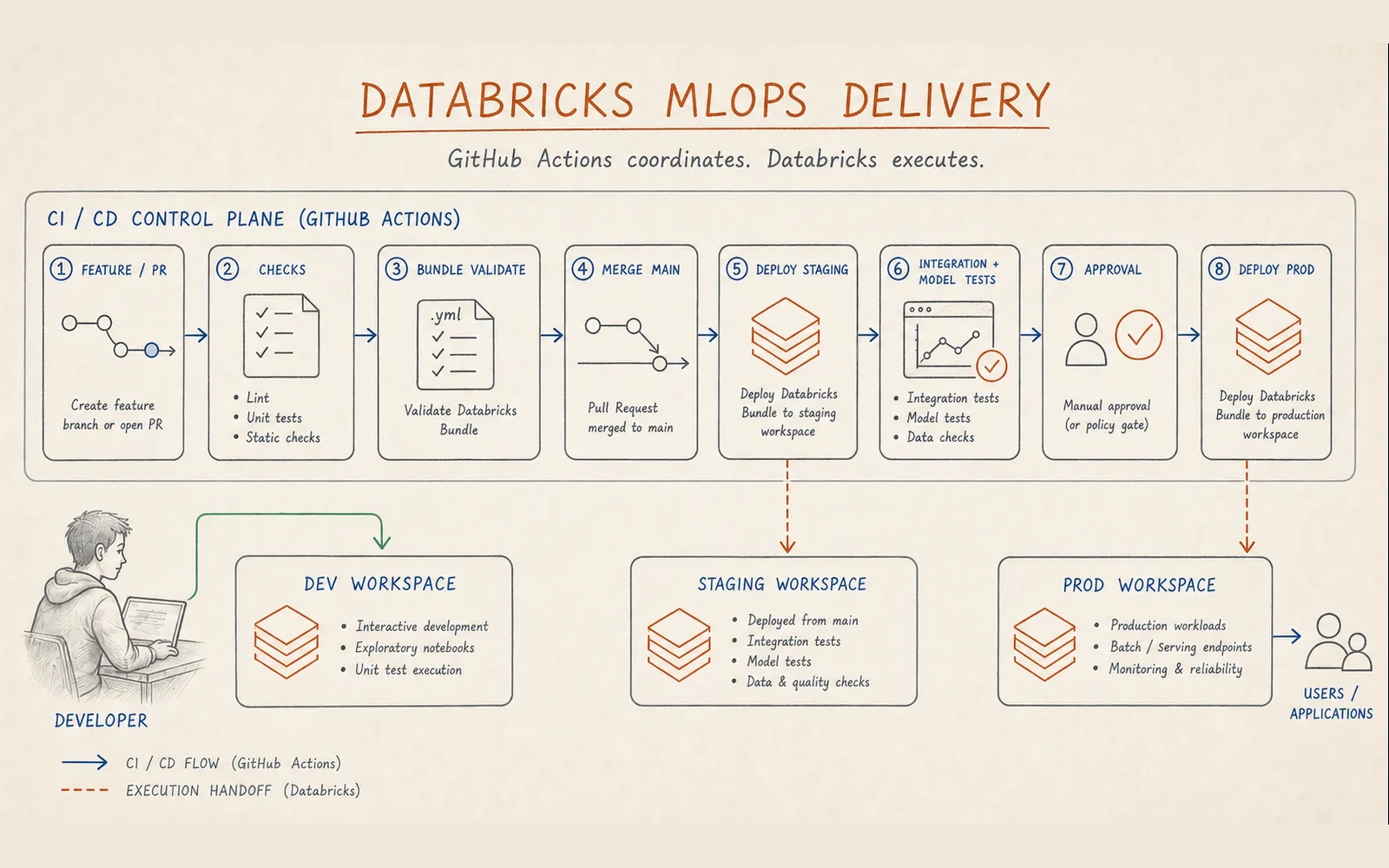
If you want the broader architectural context for how Databricks fits among other production ML operating models, read ML delivery patterns with MLflow: Azure ML, Databricks and what survives production. This article is narrower. It is about how to make production ML on Databricks behave like a real delivery system.
Why ML delivery on Databricks is not just CI/CD for jobs
Official Databricks guidance on CI/CD for machine learning is useful because it states the obvious thing teams still underestimate: for ML, CI/CD is not only about code assets.
Training data, input pipelines, validation logic, model artifacts, predictions and runtime behavior all need controlled change. That is why a successful bundle deploy is not the finish line. It only tells you that Databricks resources and source files were deployed coherently. It does not tell you whether the resulting training run is trustworthy, whether the model should replace the current version, or whether the staging environment is representative enough to reveal the right failures.
That is the first framing I would standardize with any team:
deployment success is not the same thing as production readiness.
The default ML release pattern: deploy code
There is one decision worth making explicit before discussing YAML or runners: are you promoting a model artifact, or the code that produces and operates it?
For most Databricks ML systems, the better default is deploy code. The versioned training, validation, inference and monitoring code moves through environments as one delivery contract. Staging runs that code against representative data and integrations; production runs the approved code against production data. This keeps retraining inside the controlled production boundary and makes the result reproducible.
That does not mean model artifacts are unimportant. Models have their own lifecycle in MLflow and Unity Catalog, and a new model version can be evaluated, compared and selected independently of a code change. But that model gate should sit inside a deploy-code delivery pattern rather than replace it.
Deploy model is a useful choice for specific use cases: for example, when training is extremely expensive, difficult to reproduce, or deliberately separated from the delivery environment. It is not the default I would start with for a general production ML platform. In the rest of this article, a promotion means promoting the versioned bundle and code; model promotion remains a separate, explicit release decision.
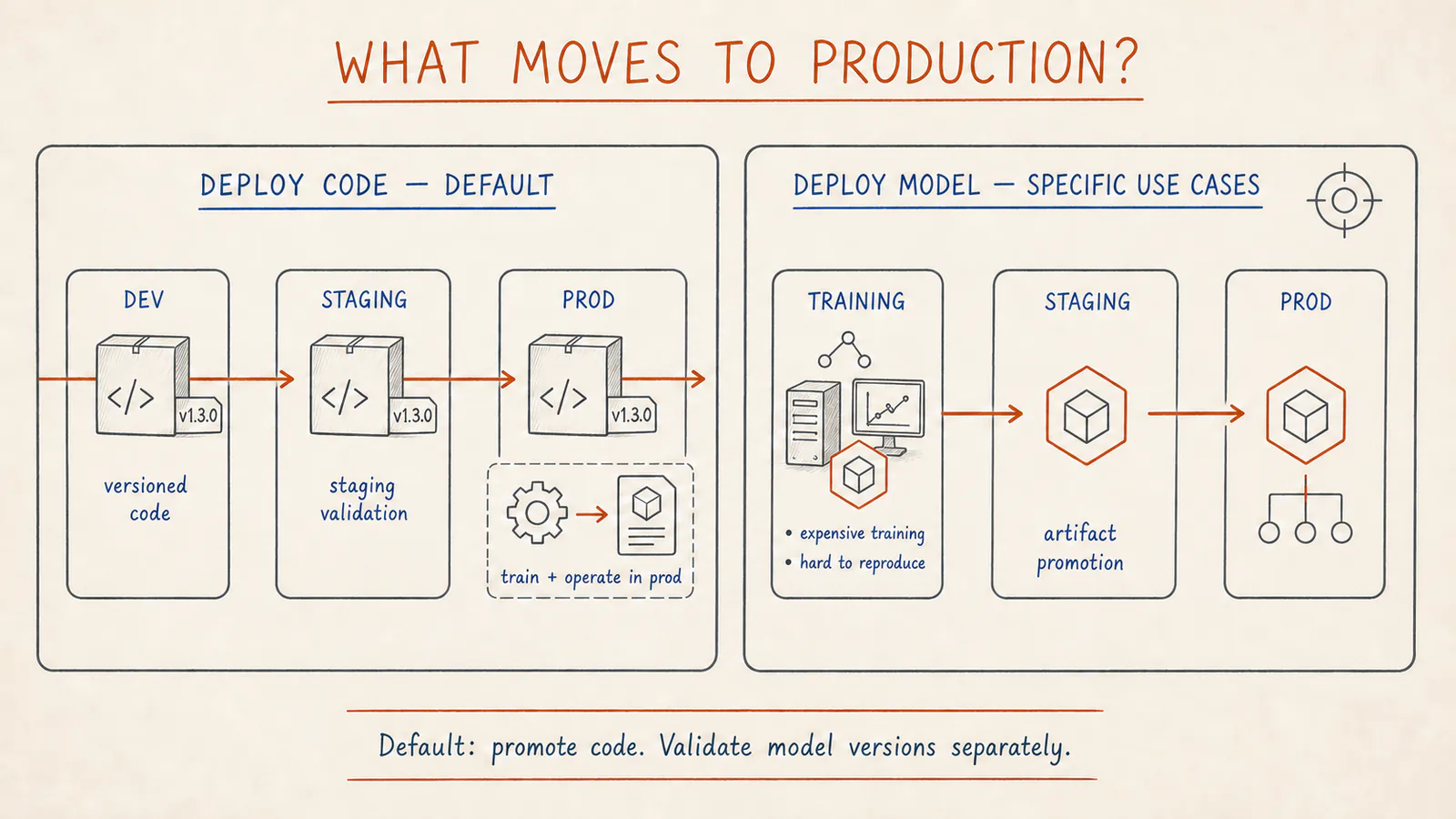
In the default pattern, the versioned delivery contract moves through environments while model versions are validated separately. Artifact promotion is appropriate for specific use cases, including expensive or hard-to-reproduce training.
Why Declarative Automation Bundles should usually be the default
Databricks is pretty clear now on this point. In the official CI/CD documentation and the newer developer best practices page, Declarative Automation Bundles are the recommended default for Databricks workload delivery.
That recommendation matters because it settles a boundary that many teams keep muddy for too long.
Bundles, formerly known as Databricks Asset Bundles, are meant to version and deploy the Databricks-side unit of a project: source files, job definitions, pipeline definitions, model-serving endpoints, MLflow-related resources, tests and environment-specific deployment configuration. The official bundles overview explicitly positions them as the end-to-end definition of a deployable data or AI project.
In practical terms, that means a Databricks ML project should usually put these things together:
- training and validation code
- batch or inference workflow definitions
- pipeline definitions
- serving endpoint definitions when applicable
- target-specific settings for dev, staging and prod
- tests and artifact mapping
That is a much better default than scattering them across notebooks, manually configured jobs and half-synchronized CI scripts.
What GitHub Actions should control, and what it should not
GitHub Actions is useful here when it is your chosen CI/CD runner, but only if you keep its role disciplined. The runner is replaceable; the delivery boundaries are not.
According to the official Databricks GitHub Actions page, GitHub Actions can validate, deploy and run bundle-defined jobs. The high-level Databricks CI/CD flow also frames it correctly: version, code, build, deploy, test, run, monitor.
That is close to how I would use it in production ML:
- Run unit tests and static checks on pull requests.
- Build and version artifacts when the project needs them.
- Run
databricks bundle validate. - After merge to
main, deploy the bundle to staging. - Trigger the right validation or training jobs in staging.
- Promote to production only when both staging and ML-specific validation gates pass.
What GitHub Actions should not do is pretend to become the execution runtime for ML logic. Training, validation, inference refreshes and serving updates should still live where they belong: in Databricks jobs, pipelines and model lifecycle controls.
GitHub Actions should coordinate the release flow. Databricks should execute the workload.
The real boundary: Bundles versus Terraform
One of the most useful recommendations in the new Databricks best practices is also one of the easiest to ignore.
Databricks recommends using Terraform only for external resources. In their wording, Terraform should primarily own cloud-level or admin-level infrastructure, while Declarative Automation Bundles should own the Databricks resources that make up the project delivery flow.
That is a strong recommendation, and I think most teams should follow it.
A good operational split usually looks like this:
Declarative Automation Bundles
- jobs
- Lakeflow or ML pipelines
- model-serving endpoints
- workload-level permissions
- environment-specific deployment settings
- ML delivery code and configuration
Terraform
- workspace provisioning
- networking
- storage credentials and cloud bindings
- broader Unity Catalog or account-level administration
- external infrastructure that should not be controlled by project teams directly
The reason this matters is not aesthetic. It is to reduce drift and ownership confusion. Once the same ML resource is half-owned by Terraform and half-owned by bundle deploys, teams start debugging control-plane conflicts instead of shipping models.
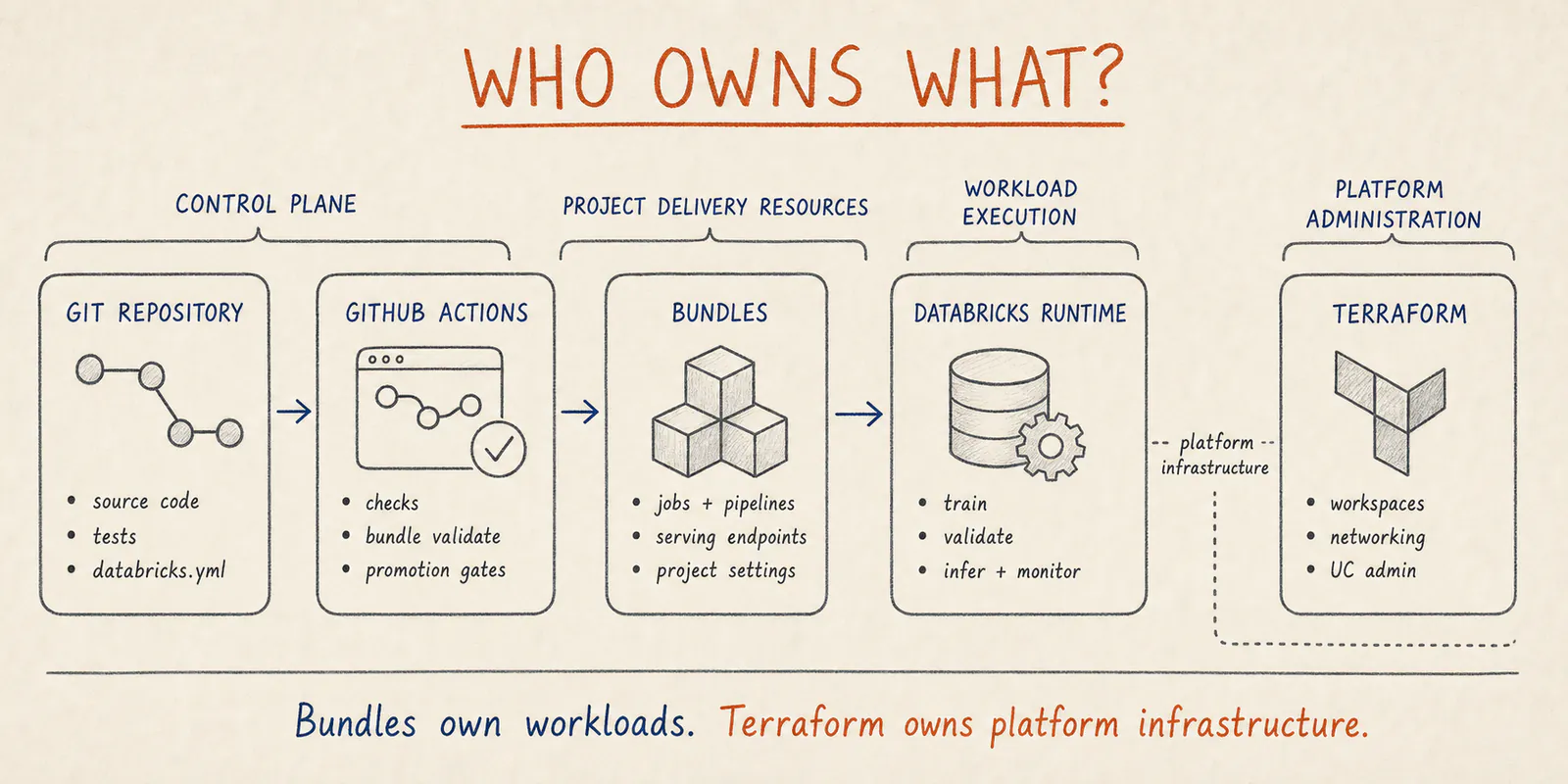
The ownership boundary is deliberate: Bundles define project workloads, while Terraform owns platform infrastructure and privileged administration.
Environment design matters more than YAML quality
The official developer best practices make a few recommendations that are worth taking literally:
- small teams can start with two workspaces: dev and prod
- growing teams should move toward dev, staging and prod
- staging should be functionally representative of production
- use one metastore with separate dev, staging and prod catalogs
- use personal schemas in non-production catalogs
- bind the production catalog in
ISOLATEDmode to the production workspace
The important phrase there is functionally representative.
For production ML, staging is where most teams discover whether they have a real delivery system or only a deployment script. If staging has different schemas, weaker integrations, unrealistic data volume, missing runtime identities or no meaningful downstream checks, then passing staging tells you very little.
This is where ML systems are more demanding than ordinary workflow delivery. The model does not only need code to run. It needs realistic input contracts, realistic feature paths, realistic permissions and enough validation to catch a bad release candidate before production sees it.
That is why I would treat staging design as one of the core MLOps decisions, not as an afterthought.
The minimum GitHub Actions flow I would recommend
For a small or mid-sized production ML team on Databricks, I would start with a workflow closer to this than to a giant enterprise template:
Pull request from a short-lived feature branch
  -> unit tests
  -> lint / static checks
  -> databricks bundle validate
  -> no deployment to the shared staging workspace

Merge to main
  -> deploy the bundle to staging
  -> run integration, data and model validation jobs
  -> pass the GitHub Environment approval gate
  -> deploy the same main revision to production
  -> trigger a controlled production job or serving update
  -> verify run completion and release signals
That sounds simple, but it already forces the team to answer the right questions:
- what should be tested before deploy
- what should be tested only after deploy
- what Databricks job acts as the release gate
- what signals are strong enough to block promotion
The Databricks docs recommend workload identity federation for CI/CD authentication. If you are using GitHub Actions for production automation, that should be your default. Configure the federation policy against GitHub Environments such as staging and production, grant id-token: write, and keep the workspace host and service-principal client ID as environment variables. Long-lived secrets in CI are exactly the kind of leftover operational debt that teams regret later.
A practical bundle shape for production ML
The official MLOps Stacks documentation and the broader MLOps Stacks overview are useful not because every team should adopt the stack as-is, but because they show what Databricks itself considers a production-worthy project structure.
The main idea is sound:
- source code and deployment config are versioned together
- training, validation and inference jobs are explicit resources
- GitHub Actions or another CI system orchestrates promotion
- models are governed through MLflow and Unity Catalog rather than through ad-hoc handoffs
A small bundle for production ML does not need to be huge. It does need to be coherent.
Something like this is often enough:
bundle:
  name: churn-ml

include:
  - resources/*.yml

targets:
  dev:
    mode: development
    workspace:
      host: https://adb-dev-workspace
  staging:
    workspace:
      host: https://adb-staging-workspace
  prod:
    mode: production
    workspace:
      host: https://adb-prod-workspace
And then in resources/ you keep the pieces that matter operationally: training jobs, validation jobs, batch inference jobs or model serving configuration.
The point is not the YAML itself. The point is that the ML release contract stops being tribal knowledge.
Where teams usually get hurt first
The first failures are rarely “we forgot how to call bundle deploy.”
They are usually these:
1. The deployment principal and the runtime principal are the same
Databricks explicitly recommends separate identities for deployment and runtime. That is correct. The workflow that deploys resources should not automatically inherit the data access of the production job that runs them.
2. The bundle is too large
The new best practices guidance recommends small bundles, not one giant bundle for the whole platform. That is especially true for ML. Training, feature engineering, inference and monitoring might be related, but they do not always share the same lifecycle or rollback boundary.
3. The team validates deployment, not model release
bundle validate catches configuration problems. It does not tell you whether the model candidate is good enough. Production ML still needs explicit release checks around metrics, slices, input assumptions or downstream impact.
4. Staging is structurally different from production
Once staging stops resembling the real runtime path, it stops protecting production.
5. Notebook logic stays too thick
Databricks says this directly in its best practices: minimize business logic in notebooks. For ML projects, that matters even more. If training logic, feature logic or validation logic cannot be imported and tested like normal code, CI/CD gets shallow very quickly.
A small but realistic GitHub Actions shape
The official GitHub Actions examples from Databricks show the basic mechanics correctly: set up the CLI, deploy the bundle, then run the relevant job. For a production ML workflow, I would adapt that shape but keep the structure disciplined.
name: databricks-ml-delivery

on:
  pull_request:
    branches: [main]
  push:
    branches: [main]

permissions:
  contents: read

jobs:
  pr-checks:
    if: github.event_name == 'pull_request'
    runs-on: ubuntu-latest
    steps:
      - uses: actions/checkout@v4
      - uses: databricks/setup-cli@main
      - run: pytest
      - run: ruff check .
      - run: databricks bundle validate --target staging

  deploy-staging:
    if: github.event_name == 'push'
    runs-on: ubuntu-latest
    environment: staging
    permissions:
      contents: read
      id-token: write
    env:
      DATABRICKS_AUTH_TYPE: github-oidc
      DATABRICKS_HOST: ${{ vars.DATABRICKS_HOST }}
      DATABRICKS_CLIENT_ID: ${{ vars.DATABRICKS_CLIENT_ID }}
    steps:
      - uses: actions/checkout@v4
      - uses: databricks/setup-cli@main
      - run: databricks bundle validate --target staging
      - run: databricks bundle deploy --target staging
      - run: databricks bundle run model_validation_job --target staging

  deploy-production:
    if: github.event_name == 'push'
    needs: deploy-staging
    runs-on: ubuntu-latest
    environment: production
    permissions:
      contents: read
      id-token: write
    env:
      DATABRICKS_AUTH_TYPE: github-oidc
      DATABRICKS_HOST: ${{ vars.DATABRICKS_HOST }}
      DATABRICKS_CLIENT_ID: ${{ vars.DATABRICKS_CLIENT_ID }}
    steps:
      - uses: actions/checkout@v4
      - uses: databricks/setup-cli@main
      - run: databricks bundle deploy --target prod
      - run: databricks bundle run production_smoke_checks --target prod
The production GitHub Environment should have required reviewers or an equivalent policy gate. The workflow only reaches it after staging validation succeeds, while the environment protects the final production deployment.
The key point is not the syntax. It is the sequencing. The ML validation job is part of the release flow, not an optional extra.
What I would standardize before calling it Databricks MLOps
Before I would call a setup “Databricks MLOps” in a serious sense, I would want these things to be true:
- The deployable unit is defined clearly through a small, versioned bundle.
- GitHub Actions or another CI system orchestrates promotion predictably.
- Workspaces and catalogs are separated by environment with a real production boundary.
- Deployment identity and runtime identity are different.
- Training, validation and inference jobs are explicit release resources.
- The model release gate is not confused with deployment success.
- Logging and operational metrics are treated as part of the deployment contract, including run status, duration, retries and freshness or throughput signals.
That is already enough to move from “we can deploy ML code on Databricks” to “we have a Databricks MLOps delivery pattern that teams can actually operate.”
FAQ
What is the best default CI/CD pattern for production ML on Databricks?
For most teams, the best default is Git-based CI/CD, Declarative Automation Bundles as the deployment contract for Databricks resources, and separate development, staging and production targets with validation gates between them. GitHub Actions is a good control plane when it is already the team’s CI/CD runner.
Should I use Declarative Automation Bundles or Terraform for Databricks MLOps?
Use Declarative Automation Bundles for Databricks workload resources such as jobs, pipelines, model-serving endpoints and ML project deployment settings. Use Terraform mainly for cloud-level or external infrastructure such as workspaces, networking, storage credentials and broader platform administration.
What should GitHub Actions actually do in a Databricks MLOps flow?
GitHub Actions should validate code, package artifacts when needed, validate the bundle, deploy to a target workspace, trigger the right training or validation jobs, and enforce promotion rules between environments. It should coordinate the flow, not replace Databricks workload execution itself.
What usually breaks first in Databricks ML CI/CD?
The first real problems are usually not the YAML syntax. They are environment boundaries, staging data realism, identity separation, bundle ownership boundaries, and the mismatch between a successful deploy and a production-ready model release.
Final point
If the goal is production AI, then Databricks CI/CD should not be optimized for “how fast can we push config.”
It should be optimized for something more demanding: can a team repeatedly move ML code, data-dependent workflows and model release decisions through environments without guessing, without manual drift, and without confusing a working pipeline with a production-ready model.
That is the level where GitHub Actions, Declarative Automation Bundles and Databricks MLOps finally start fitting together.
Further reading
- Developer best practices on Databricks
- CI/CD on Azure Databricks
- GitHub Actions for Databricks
- Workload identity federation for GitHub Actions
- What are Declarative Automation Bundles?
- Declarative Automation Bundles for MLOps Stacks
- How Databricks supports CI/CD for machine learning
- Model deployment patterns
- ML delivery patterns with MLflow: Azure ML, Databricks and what survives production
- Why MLOps is mostly an engineering problem
- Minimal viable ML observability: what to monitor first