In one project involving waste analysis, I worked with a data agent that struggled with what an amount of waste meant. Depending on the question, the user could mean its mass, volume, cost or something else. The distinction was familiar to the people using the data, but the agent didn’t interpret it reliably.
That project might have been different if we had some knowledge base in place, but we didn’t. So we did a complete 180-degree shift and replaced the agent with a dashboard containing five simple key performance indicators (KPIs).
I’m not saying we have to replace all data agents with dashboards now, but we can treat that as an example. I think it’s easy to start designing around the freedom of a conversational interface. A dashboard makes you choose which measures to present. An agent leaves more of that selection until someone asks a question. But the definitions still need to come from somewhere, and the system has to recognize when the question doesn’t identify one.
In this article, we’ll look at how semantic layers give AI agents business context, and how to decide which questions an agent should be able to answer.
What is a semantic layer?
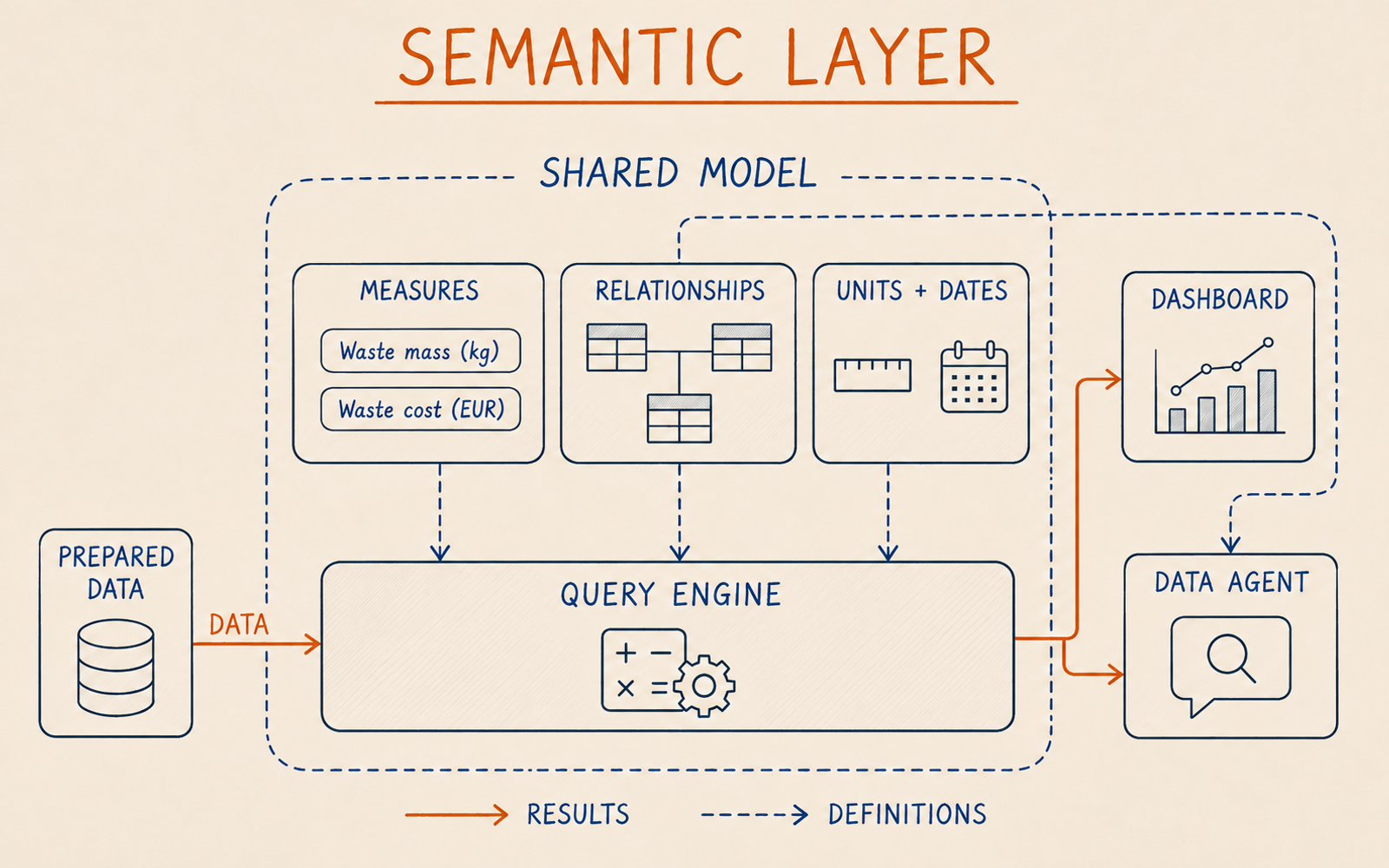
A semantic layer connects business concepts to data, relationships and calculations that consumers can query. It defines what a measure means and how to calculate it for a chosen scope. A semantic model describes these elements, and a query engine applies them to the underlying data.
Consider a field described as waste cost. The label gives us a starting point, but we still need to know which costs it includes, which unit of measure it uses and how it changes when we group records by month. A maintained calculation can answer those questions consistently whenever and wherever consumers invoke it. A description alone will leave each application to implement its own interpretation.
The physical implementation may, as always, vary. Definitions might live in a BI semantic model or in a separate metrics service. Some calculations may already be implemented in warehouse views. The data warehouse article covers preparing consistent analytical records. Here, the next decision is how consumers request business results from those records without reconstructing their meaning for every query.
You don’t necessarily need another product. You do need to know where the definitions live and which execution paths use them.
What did “how much waste” mean?
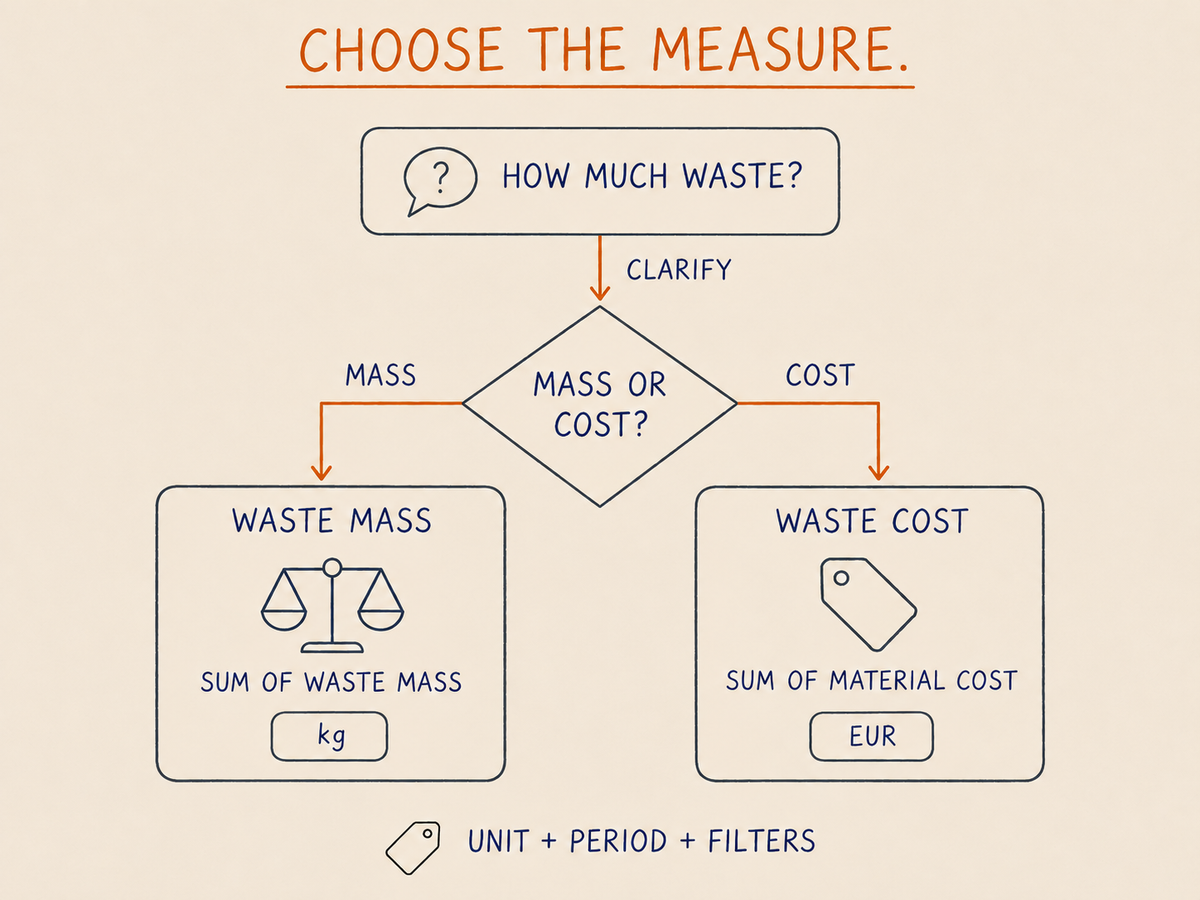
The difficulty in the project was interpreting the measure the user intended. Mass and cost both describe waste, but they support different comparisons. A large mass of inexpensive material and a small mass of expensive material can lead to different rankings. A correct calculation of one won’t answer a question about the other.
With the dashboard, we committed to five KPIs. That gave users a fixed set of measures to work with. A conversational application also has to choose a measure from the question and its context. If that choice remains unclear, it should ask for clarification. Quietly selecting a default can produce a plausible answer that the user reads as something else.
I wouldn’t use this experience to claim that better descriptions would have fixed the agent. We simply chose a different interface. For me, the lesson is to settle the scope of the analysis before deciding how much interpretation to delegate to the application.
What should the semantic layer define?
Let’s use a simplified production example. The measures and records below are illustrative. They are separate from the project and are not its five KPIs.
Suppose a team records material input and waste for production batches. Before exposing those records to an agent, the team agrees on three measures:
| Business question | Definition and unit | Rule to agree |
|---|---|---|
| How much material became waste? | Sum of recorded waste mass, in kg | Which waste categories and production periods are included? |
| What was the material cost of that waste? | Sum of waste mass multiplied by the assigned material cost per kg, in EUR | Which cost version applies to each record? |
| What share of material input became waste? | Total waste mass divided by total input mass for the selected batches, expressed as a percentage | Do both totals cover the same batches and period? |
The cost definition is deliberately narrow. It excludes labour, disposal fees and recovery value. A business could choose another definition, but then the name and calculation should make that choice clear. Currency conversion would also need its own rule if the inputs used several currencies.
Start with the records behind the measure
In this example, a batch record contains its material input. Several waste records can refer to that batch, each with its own identifier and mass. This is the grain, or what one row represents. A dimension, such as material, production date or site, describes how a user can filter or group those records. A measure calculates a result within that selection.
Now imagine joining a batch directly to its three waste records. The batch’s input mass appears three times in the joined result. Summing that column would overstate the input and understate the waste percentage. Valid identifiers and successful SQL execution would not make that answer correct.
The model needs relationships and calculations that preserve each quantity at its intended grain. One approach is to aggregate waste to the batch before combining totals. A model with separate facts can also work, provided its relationships and measures produce the intended result. Microsoft’s star schema guidance explains how facts, dimensions and relationships support filtering and summarization in Power BI semantic models.
Define what happens when the selection changes
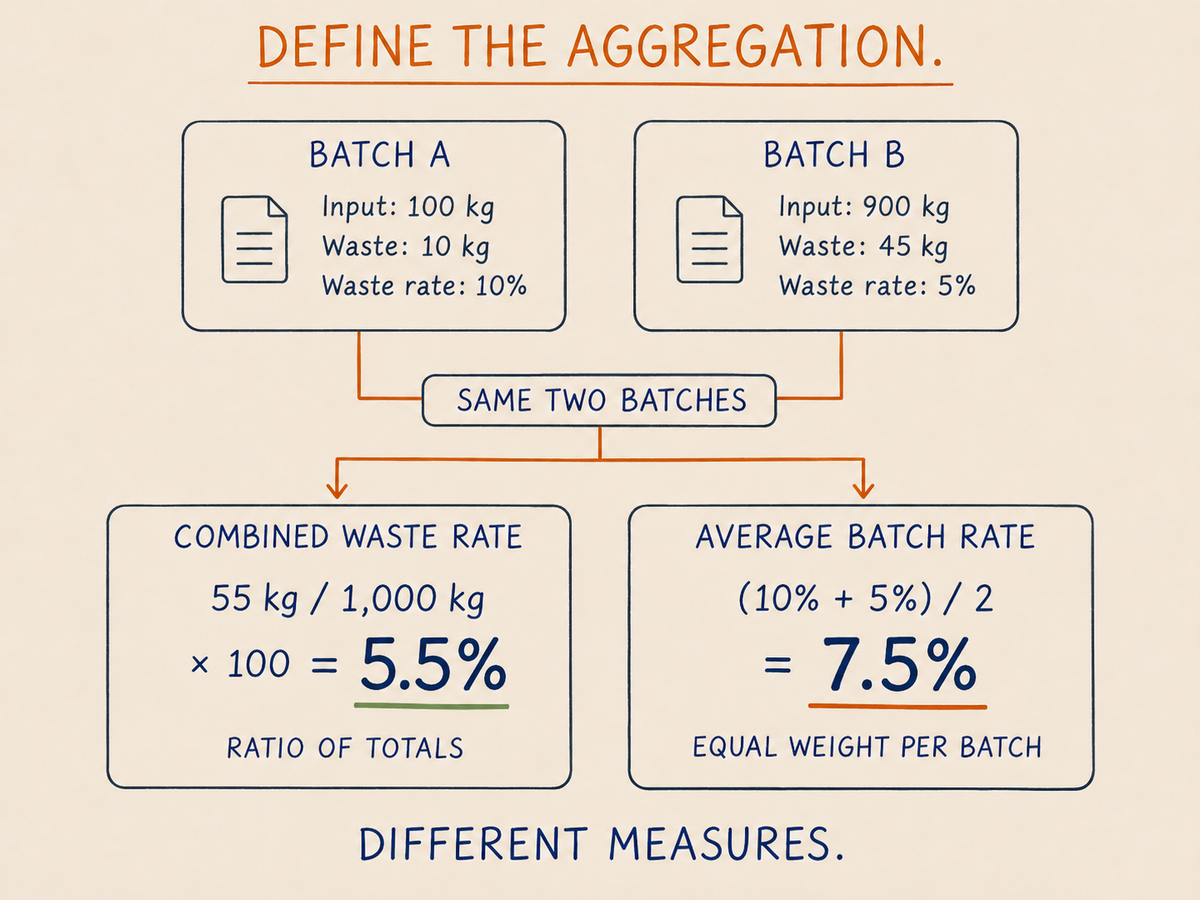
Take two batches. The first has 10 kg of waste from 100 kg of input, giving 10%. The second has 45 kg from 900 kg, giving 5%. Their combined waste percentage is 55 / 1,000 × 100 = 5.5%. Averaging the two percentages would give 7.5%, which describes a different calculation. A reusable measure should calculate the ratio from the selected totals. Storing percentages and letting every consumer decide how to summarize them leaves room for disagreement between the dashboard and agent.
Allowed breakdowns matter too. If waste has a reason code but input exists only at batch level, a breakdown by waste reason needs an explicit denominator rule. The team might show each reason’s contribution against the same total batch input. It shouldn’t invent an allocation of input to reasons merely because a user requests that grouping.
Dates require the same care. Production date and cost posting date can place a record in different months. The model should identify which date a measure uses by default and which alternatives are supported. An answer should make its period visible, especially when the user changes that choice.
Finally, zero waste, missing waste records and an undefined percentage are different states. A batch with confirmed zero waste can contribute zero to the numerator. A missing export leaves completeness uncertain. Zero input makes the ratio undefined. If the application turns all three into 0%, users cannot tell whether the operation performed well or the calculation lacked evidence.
How does that context reach a data agent?
Suppose a user asks for waste mass by site last month. The application needs to select the mass measure, resolve the period, apply the site grouping and query the supported interface. The engine calculates the result. The agent then explains it with its unit and scope.
The model needs enough context to make those selections. That might arrive through model metadata or a tool description listing supported measures and filters.
The execution path must then apply the maintained definitions. If the agent bypasses that path and calculates a fresh ratio from unrelated raw columns, the existence of a semantic layer elsewhere won’t help.
This is a more specific requirement than making definitions discoverable. The data fabric article explains connecting descriptions and access paths across systems. For an individual agent, check which descriptions reach the query generator and which definitions the resulting query actually invokes.
An example in Microsoft Fabric
A Power BI semantic model can hold explicit measures, relationships and descriptions over prepared data. Explicit measures use DAX, Power BI’s expression language, to calculate values for the current selection. For our example, the model would define waste mass, material cost and the ratio of waste to input. The agent can query those measures without having to invent their formulas each time.
Fabric’s semantic model guidance for data agents describes Prep for AI as the place to configure the relevant schema, instructions and verified answers. The schema focuses the objects used for query generation. Instructions explain terminology and defaults. Verified answers provide approved question-and-visual configurations that guide query generation. They don’t make every related answer correct by definition.
There is a configuration boundary here that is easy to miss. According to the current documentation, the DAX generation tool uses the semantic model’s metadata and Prep for AI configuration. Instructions placed at the data agent level are ignored for DAX query generation. Putting a rule into the conversation orchestrator therefore doesn’t establish that the component building the query received it.
For the waste example, I would expose clearly distinguished mass and cost measures, retain the objects their calculations depend on, and describe the date and unit rules. I would then inspect generated queries for representative questions. The AI data schema documentation also describes capability-specific limits. Treat schema selection as guidance for supported AI experiences, with access permissions enforced separately.
Other implementations place the definitions differently. The dbt Semantic Layer defines metrics over existing models and handles joins through MetricFlow. Applications can request those metrics through supported interfaces. The architectural question stays the same: does this consumer use the agreed calculation, or does it reconstruct one independently?
How does a semantic layer support an AI-ready platform?
As a reminder, an AI-ready data platform lets AI understand and safely use its data.
For these analytical questions, understanding starts with distinguishing a mass from a cost, knowing how to aggregate it and identifying the period it describes. The semantic layer gives the application maintained definitions for those choices. It also gives the team a place to resolve disagreements before every application develops a separate answer.
Someone still has to own those decisions. As discussed in the data mesh article, ownership includes time to maintain definitions and support consumers. If the cost basis changes, the owner should identify the affected measures and tell the dashboard and agent teams what changed. The applications need to use the intended definition and test its effect on their answers.
Safe use also requires controls during execution. An employee permitted to inspect waste mass at one site may not be permitted to inspect detailed costs across all sites. The query path must enforce that employee’s allowed access. Hiding a field from an AI schema or telling the model to avoid it is not an authorization check. If an application uses a shared service identity, its permissions and any delegated user restrictions need deliberate design.
The distinction becomes more consequential when an agent can act. Reading a waste metric doesn’t authorize changing a production setting. An action tool needs separate permission and validation against the current operational state. A semantic model can explain a result without deciding whether an employee may act on it.
Even within read-only analysis, definitions cannot repair incomplete inputs. The application needs freshness and completeness information appropriate to the question, and it must preserve uncertainty when the source cannot support a result.
When a dashboard might be the better interface?
For the project that opened this article, we replaced the agent with five KPIs in a dashboard. That made the scope explicit. I would consider the same approach when users return to a small set of questions and need to compare the answers regularly. Labels, units, filters and neighbouring measures give them context without requiring them to formulate a new request each time.
A conversational interface becomes more useful when the combinations vary. Someone may want waste mass for one site, then a breakdown by material, then the same comparison for another period. An agent can help navigate those requests if the model supports them. A semantic layer provides a reusable basis for that exploration, while the application handles conversation and clarification.
There will still be questions the data doesn’t answer. A request to explain why waste increased may require operational evidence beyond the records used to measure the increase. The agent should distinguish a calculated change from a supported explanation of its cause. Adding more accessible tables without defining their relationships can make that problem harder.
I would choose the interface after identifying the recurring questions and the useful variations. A dashboard and agent can also share definitions, with the dashboard handling routine monitoring and the agent supporting additional analysis within an agreed scope.
What should you check before giving the model access?
Use a few questions with known expectations. Include cases where the correct response requires clarification or an explicit limitation:
- Ambiguous measure: ask about an amount of waste without a unit. Check whether the application resolves the intent or asks which measure the user means.
- Aggregation: combine batches of different sizes. Check the ratio of totals and the effect of the requested grouping.
- Date choice: use records whose production and posting dates fall in different months. Check which period the answer describes.
- Missing information: distinguish a confirmed zero, incomplete records and a zero denominator. An unavailable result should remain distinguishable from a valid zero.
- Denied access: request restricted costs with an unauthorized identity. Confirm that execution prevents disclosure, including through alternate query paths.
- Unsupported question: ask for a cause or action that the analytical model cannot establish. Check that the agent explains the limit instead of inventing evidence.
Inspect the selected measure, filters, generated query and result together. A fluent explanation can accompany the wrong calculation. Keep some evaluation questions separate from examples used to guide the agent so that validation also exercises unfamiliar wording.
Before expanding access, take a handful of real questions to the people who use the data. Agree on the measure, period, allowed breakdowns and what should happen when the question is ambiguous. Then choose the interface and verify that it delivers those answers.
FAQ
What is a semantic layer?
A semantic layer connects business concepts to data, relationships and calculations that consumers can query. It defines what a measure means and how to calculate it for a chosen scope, such as waste mass by production month. A query engine applies those definitions to the data.
Why do AI agents need a semantic layer?
A semantic layer for AI agents provides maintained definitions that help them choose measures, relationships and filters. It reduces the business logic each application has to reconstruct. The agent still needs to receive that context, use the supported query path and clarify questions that have several valid meanings.
How is a semantic layer different from a data warehouse?
A data warehouse prepares and stores analytical data. A semantic layer exposes business concepts and calculation rules for querying it. Their responsibilities can overlap, and a warehouse may already contain useful definitions in its views. The important question is which definitions consumers use when they request a result.
Can a dashboard be a better choice than a data agent?
Yes. A dashboard can fit recurring questions about a known set of KPIs, with visible labels, units and filters. A data agent can help when users need varied combinations of questions and follow-up analysis. The choice depends on the task and the amount of interpretation the application must support.
Does a semantic layer guarantee correct and secure AI answers?
No. The definitions may be wrong, the source data may be incomplete, or the agent may select the wrong measure. Access controls must be enforced when queries execute. Teams still need to test interpretation, calculations, permissions and how the application handles missing information.
Further reading
- Semantic model best practices for data agents, on explicit measures, Prep for AI and the context used by DAX generation.
- Star schema guidance for Power BI, on grain, relationships and measures in semantic models.
- Prepare your data for AI: AI data schemas, on selecting model objects and the limits of that selection.
- dbt Semantic Layer, for another implementation of shared metric definitions and query interfaces.